
Help desk automation means letting software handle the repeatable parts of support: tagging, routing, prioritising, drafting replies, redacting personal data and following up. Zendesk, Intercom, Freshdesk, HubSpot and Salesforce all ship rule engines that cover the predictable cases, where the condition is a field value or a timer. The workflows that need someone to read the ticket first (what it is about, how upset the customer is, which team owns it) are where an AI layer earns its place.
Below are 15 workflows worth automating, what each one fixes, the order to roll them out in, and the ready-made template for each in Open's template library.
TL;DR
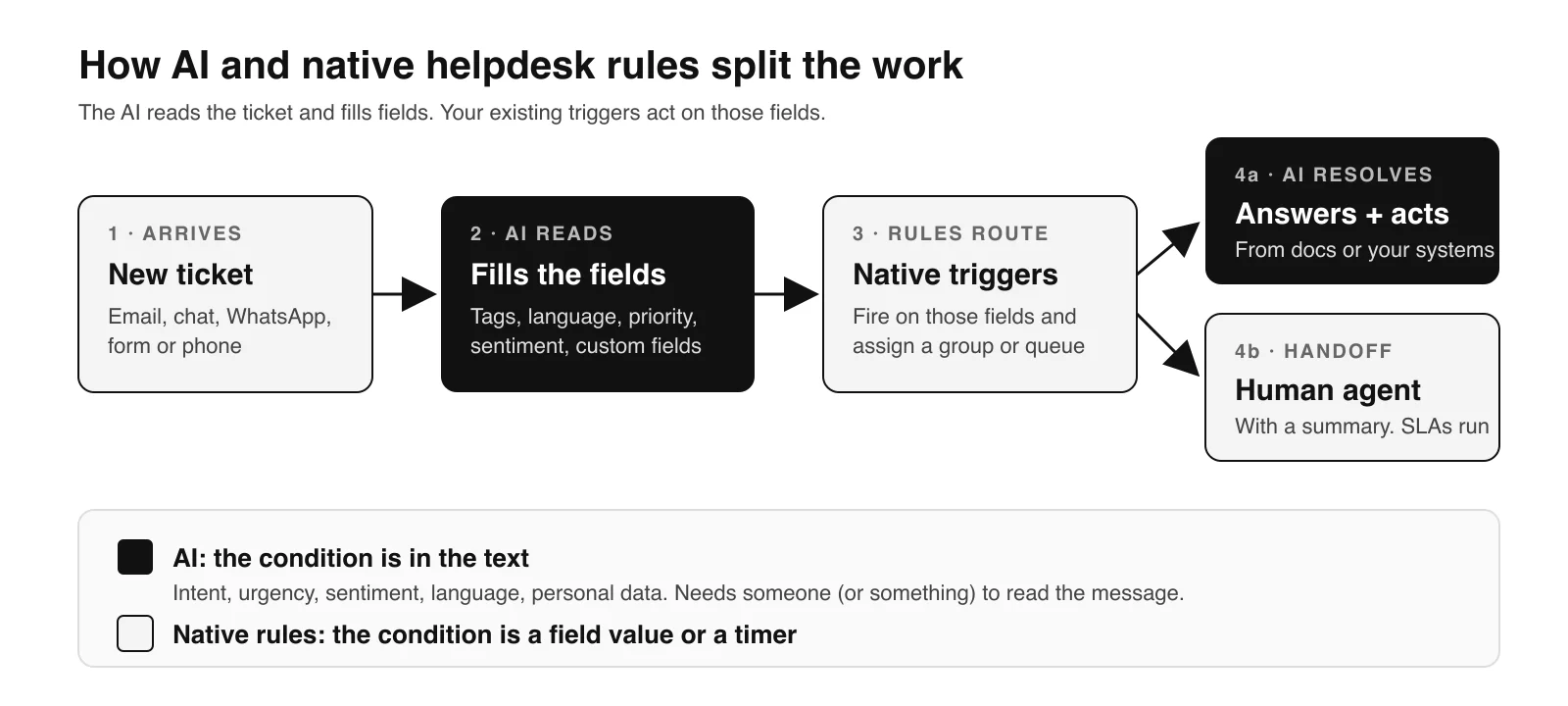
- Native rules (Zendesk triggers and automations, Intercom Workflows, Freshdesk automation rules, HubSpot workflows, Salesforce assignment and escalation rules) are the right tool when the condition is a field value or a timer.
- AI is the right tool when the condition lives in the text: intent, sentiment, language, urgency, personal data.
- Start with the "read the ticket" workflows: tagging, custom fields, language and priority. Nothing reaches the customer, and every rule downstream gets better inputs.
- Then automate what customers notice: email replies, escalation and follow-ups, in review mode first.
- Keep your helpdesk. Run the AI inside it so your reports, SLAs and macros keep working. Open works as a teammate in Zendesk, Intercom, Freshdesk, HubSpot and Salesforce.
What native help desk automation already does well
Before adding anything, use what you already pay for. Every major helpdesk handles condition-and-action logic well.
| Helpdesk | Native engine | How it runs | Good for |
|---|---|---|---|
| Zendesk | Triggers and automations | Triggers run "immediately after the qualifying event happens". Automations run once every hour on all non-closed tickets | Assignment by form or brand, SLA reminders, auto-close after N days without a reply |
| Intercom | Workflows | Fire on triggers such as "Customer sends their first message", "Customer sends any message" or "Customer has been unresponsive". Included on the Advanced and Expert plans | Inbound triage, collecting details before handoff, routing by attribute |
| Freshdesk | Automation rules | Three types: ticket creation, ticket updates, and hourly triggers that scan all tickets once an hour | Assignment by group, status changes, reminders on stale tickets |
| HubSpot | Workflows (Service Hub) | Ticket-based workflows. Pricing lists "Full automation" on Professional and Enterprise, "Limited automation" on Starter | Ticket property updates, escalations, follow-up tasks |
| Salesforce | Assignment, escalation and auto-response rules, plus Flow | Assignment rules route new cases, escalation rules act on cases left unsolved past a set time | Queue assignment, SLA escalation, acknowledgement emails |
Two limits matter for planning. Each Zendesk automation can act on at most 1,000 tickets an hour, and you can have at most 500 active automations (Zendesk, checked 15 Nov 2026). Freshdesk hourly triggers check once an hour, so any time condition has to be at least 60 minutes (Freshdesk, checked 15 Nov 2026).
Neither limit hurts SLA nudges. Both hurt if you try to build "understand this ticket" logic out of keyword conditions, which is where most rule sprawl comes from.
A simple test: if you can write the condition as field = value or hours since X > N, use a native rule. If someone would have to read the message to decide, use AI.
The 15 workflows
Each workflow links to a template that runs on top of your helpdesk. Most support Zendesk, Intercom, Freshdesk, HubSpot, Salesforce and Twilio Flex. Exceptions are noted.
Group 1: read the ticket
These fill in the information every other rule depends on. Do them first.
1. Tag and label every ticket. Agents forget tags, invent new ones, or pick the first one in the dropdown. Reporting on contact reasons then turns into guesswork. An AI classifier applies the same taxonomy to every ticket, so root-cause reports become usable. Template: Automate ticket tagging and labeling with AI.
2. Fill custom fields from the conversation. Order number, product, plan, country, issue type. Customers write these in the message, and agents copy them into fields by hand or skip it. When the AI extracts them, your views, SLAs and dashboards run on complete data. Templates per helpdesk: Zendesk, Intercom, Freshdesk, HubSpot, Salesforce.
3. Detect the language. For teams in Europe and the GCC, one queue can hold Dutch, German, French, English and Arabic on the same morning. Language detection routes each ticket to the right agent, or lets the AI reply in the customer's language, without a manual triage step. Template: Automate language detection on tickets with AI.
4. Set priority from the content. "Urgent" in a subject line is a weak signal. A failed payment on a large account, a safety issue or a legal threat are strong ones, and they usually sit in the body. The AI reads urgency, severity and customer value and sets the priority field. Template: Automate ticket prioritization based on its content.
5. Score sentiment. Flag frustrated customers before they churn or post a review. Sentiment becomes a field you can route and report on, and a reason for a faster human response. Template: Automate ticket sentiment analysis.
Group 2: get it to the right place
6. Route by skill. Native routing usually assigns by group or round robin. Skill-based routing matches what the ticket needs (billing, API, a specific product, a language) to the agent who can solve it. Template: Automate skill-based routing with AI. For helpdesk-specific setups, see our guides to Intercom ticket routing and HubSpot ticket routing.
7. Escalate to the right team. Escalation rules built on keywords miss the ticket that says "this is the third time I'm writing" without using the word "escalate". Content-based escalation sends complex or sensitive cases to specialist teams with the context attached. Template: Automate escalating to the right team with AI.
8. Alert the team in Slack. An outage report, a VIP complaint or a spike in one contact reason should reach a channel, not wait in a queue. Template: Automate Slack alerts based on the customer issue or report.
Group 3: answer and resolve
9. Draft and send email replies. Email is where help desk automation pays back fastest, because the volume is high and the questions repeat. The AI drafts replies from your knowledge base and the conversation, sends them when it is confident, and queues them for review when it is not. Template: Automate customer email replies with AI. On Freshdesk specifically, see AI ticket responses in Freshdesk.
10. Make macros adapt (Zendesk only). Static macros are fast and generic. The AI picks the right macro, fills the variables and adjusts the wording to the conversation. Template: Automate Zendesk macros with AI.
11. Follow up by phone. Some tickets close faster with a call: a delivery that needs rescheduling, a failed payment, a customer who stopped answering email. The AI places the call based on what the ticket says. Template: Automate following up with a customer using voice calls.
Group 4: protect and improve
12. Redact personal data. Card numbers, ID numbers, health details and addresses end up in tickets and call transcripts, then flow into reports and third-party tools. Automated redaction removes them before they spread. Template: Automate PII redaction on tickets with AI.
13. QA every conversation. Manual QA usually reviews a sample of tickets. Automated QA reviews every conversation for accuracy, tone and process, then points team leads at the ones worth coaching on. Template: Automate support tickets quality assurance with AI.
14. Ask for a review only when the customer is happy. A review request after every closed ticket invites bad reviews from the customers you just let down. Gate the request on detected satisfaction instead. Template: Automate requesting review only when the customer is happy.
15. Reply to Trustpilot reviews. Public reviews need answers, and most teams fall behind. The AI drafts on-brand replies based on each review's content and sentiment. Template: Automate replying to Trustpilot reviews with AI.
Which help desk workflows to automate first
Not all 15 belong in week one. Rank them by how much downstream work they remove and how easy they are to check.
| When | Workflows | Why this order |
|---|---|---|
| Week 1 | Tagging, custom fields, language, priority | Low risk (nothing is sent to customers), easy to audit, and every rule you already have gets better inputs |
| Weeks 2 to 3 | Routing, escalation, sentiment, Slack alerts | Uses the fields from week 1. Mistakes are internal and visible |
| Weeks 3 to 6 | Email replies, macros, PII redaction, QA | Customer-facing or privacy-sensitive. Start in review mode, then raise autonomy as accuracy holds |
| After that | Phone follow-ups, review requests, Trustpilot replies | Most valuable once the core queue is under control |
Run each workflow in shadow mode first: the AI writes its answer to an internal note or a test field, and you compare it with what agents did. When the match rate is where you want it, switch it on.
Native rules vs AI workflows: how they fit together
You don't replace your triggers. The AI layer writes better data into the fields your triggers already use.
A typical Zendesk setup after automation looks like this:
- A ticket arrives. The AI reads it and sets tags, language, priority, sentiment and custom fields.
- Your existing Zendesk triggers fire on those fields and assign the ticket to a group.
- If the ticket can be answered from your knowledge base or a connected system, the AI replies and resolves it.
- If not, it hands off to a human with a summary, and your SLA automations take over.
The same pattern holds in Intercom (Workflows route on the attributes the AI sets), in Freshdesk and HubSpot (automation rules and workflows act on its ticket fields) and in Salesforce (assignment and escalation rules act on the case fields it fills). Because the AI works inside the helpdesk, your reporting stays where it is. Our post on Zendesk triggers and AI agents covers how to avoid the two layers fighting over the same ticket.
When the built-in AI is the better fit
Each helpdesk sells its own AI: Zendesk AI agents, Fin from Intercom, Freddy AI Agent in Freshdesk, Breeze in HubSpot and Agentforce in Salesforce. If you run one helpdesk, one channel and mostly FAQ-style questions, the native add-on is the shortest path. It keeps you on one vendor and one bill.
A separate AI layer makes more sense when you need the same agent across several channels (chat, email, WhatsApp, voice), when resolving a ticket means acting in other systems (refunds, order changes, bookings), or when you run more than one helpdesk across brands or regions. Our comparison of Fin and dedicated AI agents goes through that trade-off in detail.
For a sense of scale: at De Online Drogist, the largest online drugstore in the Netherlands, Open's AI agent handles 73% of support with more than 25 actions, including order tracking, returns and product recommendations. At Trunkrs, Open reaches an 80% automation rate on delivery support across email and chat.
What help desk automation costs
Native rules come with your helpdesk plan, though some engines sit on higher tiers. AI add-ons are priced per seat, per resolution, per session, or a mix. Published prices, checked 15 Nov 2026:
| Vendor | Rule engine sits on | AI agent price | Source |
|---|---|---|---|
| Zendesk | Suite plans, $55 to $115 per agent per month (annual) | $1.50 per automated resolution committed, $2.00 pay-as-you-go. Suite Team includes 5 and Suite Professional 10 per agent per month | zendesk.com/pricing |
| Intercom | Workflows on Advanced ($85) and Expert ($132) per seat per month | Fin: $0.99 per outcome | intercom.com/pricing, fin.ai/pricing |
| Freshdesk | Growth $19, Pro $55, Enterprise $89 per agent per month (annual) | Freddy AI Agent: 500 sessions included, then $49 per 100 sessions | freshworks.com/freshdesk/pricing |
| HubSpot | Full automation on Service Hub Professional ($90) and Enterprise ($150) per seat per month | Not compared here | hubspot.com/pricing/service |
Watch how each vendor defines a billable unit. Fin also bills $0.99 when a configured Procedure ends in a handoff, though a conversation passed to your team without an outcome isn't charged (fin.ai/pricing, checked 15 Nov 2026). Our AI agent pricing comparison puts these models side by side.
Open charges $0.75–$0.90 per resolution, depending on volume, and handoffs to a human aren't billed. Details are on the pricing page.
Sources
- Zendesk, "About Zendesk triggers and how they work", https://support.zendesk.com/hc/en-us/articles/4408822236058, checked 15 Nov 2026
- Zendesk, "About automations and how they work", https://support.zendesk.com/hc/en-us/articles/4408832701850, checked 15 Nov 2026
- Zendesk, pricing, https://www.zendesk.com/pricing/, checked 15 Nov 2026
- Freshdesk, "Overview of automation rules", https://support.freshdesk.com/support/solutions/articles/207276, checked 15 Nov 2026
- Freshworks, Freshdesk pricing, https://www.freshworks.com/freshdesk/pricing/, checked 15 Nov 2026
- Intercom, "How to trigger a workflow", https://www.intercom.com/help/en/articles/7434613-how-to-trigger-a-workflow, checked 15 Nov 2026
- Intercom, pricing, https://www.intercom.com/pricing, checked 15 Nov 2026
- Fin, pricing, https://fin.ai/pricing, checked 15 Nov 2026
- HubSpot, Service Hub pricing, https://www.hubspot.com/pricing/service, checked 15 Nov 2026
- Salesforce Trailhead, "Automate Case Management", https://trailhead.salesforce.com/content/learn/modules/service_lex/service_lex_case_manage, checked 15 Nov 2026
- Open, De Online Drogist and Trunkrs customer stories, https://www.open.cx/customer-stories, checked 15 Nov 2026